

RAYMOND OGLESBY @RaymondOglesby2
June 3, 2025– 3 minutes read time
Overview
Can you alphabetize in Notes? Yes! By default, the Notes app sorts your notes by most recently updated. Even if you created a note years ago, if you edit that note, it will appear at the top of the list afterward.
But you can easily sort your notes alphabetically by changing your Settings. Your notes will then be sorted according to either the title or first line (if the note does not have a title). Let explore how to sort Apple Notes alphabetically on iPhone or iPad.
Why You Will Like This Tip
- Alphabetize notes by note titles or the beginning of your note, instead of by date created or last edited.
- Alphabetize notes on iPhone and iPad to make your notes more organized and easier to find.
System Requirements
This tip was performed on an iPhone 14 Pro running iOS 18.5.
Click here to learn how to update your iPhone to the latest iOS version.
Sorting Notes Alphabetically
First, open the Settings app. Refer to below image:

Next, scroll down and tap Apps. See the image below:

Now, rap Notes. See the following image:

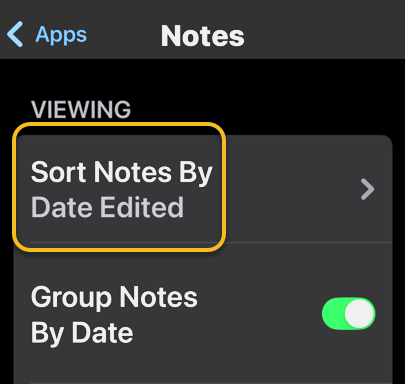
Next, tap Sort Notes By: Refer to image below:
Now, tap Title. See the image below:
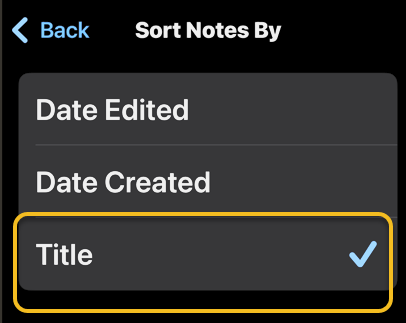
Choosing Title will sort your Notes alphabetically. You can also select Date Created if you would rather have all your notes sorted by the day each was started.
Setting Defaults
You may want to set a couple of defaults. One is to set the Title as the default heading for a New Note. See the following image:
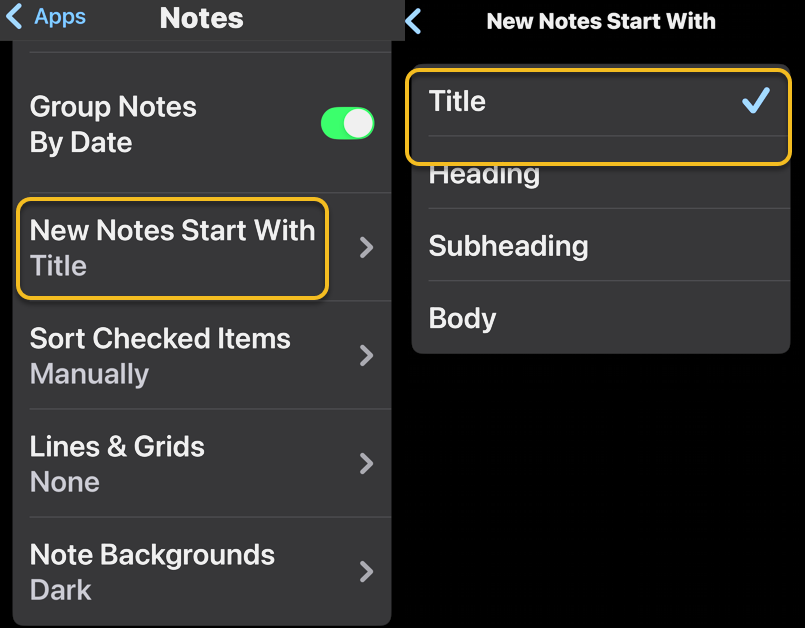
If you prefer a New Note with lines or grids, you can choose from various styles. Refer to the image below:

Disclaimer
Technology is constantly evolving, and smartphone and desktop tech rarely remains static. Therefore, the information in this post is only accurate as of the date it was written. Blog posts that are older than six months may contain instructions that are no longer compatible with your device or operating system. We hope that the content from previous posts continues to function as intended. Thank you for reading TechSavvy.Life, where technology works for you.
Quote For the Day
“Technology is not just a tool. It can give learners a voice that they may not have had before.”
― George Couros
(X) Twitter Infio
You are finished. Please feel free to share this post! One way to share is via Twitter.
Just click the Tweet icon below. This will launch Twitter where you click its icon to post the Tweet.
Checkout TechSavvy.Life for blog posts on smartphones, PCs, and Macs! You may email us at contact@techsavvy.life for comments or questions.
Tweet
I Would Like to Hear From You
We value your feedback! Was this post helpful? Please share your comments with us. If you have a tech question related to your computer or smart device, feel free to reach out. Just send an email to contact@techsavvy.life, and be sure to include the device, app, and version you are using. To assist us further, you can also attach screenshots related to your inquiry.
The author’s Vietnam eBook on the “Battle for Tra Bong Vietnam: Events and Aftermath” can be accessed from a Kindle device or the Kindle App for a desktop or smartphone. The apps are free.

 Tech Savvy Life