

IRAYMOND OGLESBY @RaymondOglesby2
July 15, 2025 – 3 minutes read time
Overview
Want to learn how to rearrange albums on an iPhone or iPad in Apple’s Photos app? When you make a photo album on your iPhone, the Photos app automatically sorts in the Albums tab when it was created.
You can rearrange albums on iPhone in two different ways. Let’s explore how to rearrange your albums in the Photos app.
Why You Will Like This Tip
- Learn how to rearrange albums in Photos on your iPhone or iPad using the drag and drop method.
- Learn how to sort albums on iPhone by Date Modified, Name, or Custom Order.
- Learn how to move albums around on iPhone so you can find your albums quickly and easily.
System Requirements
This tip was performed in iPhone 14 Pro running iOS 18.5.
Click here to learn how to update your iPhone to the latest iOS version.
How to Reorder Photo Albums
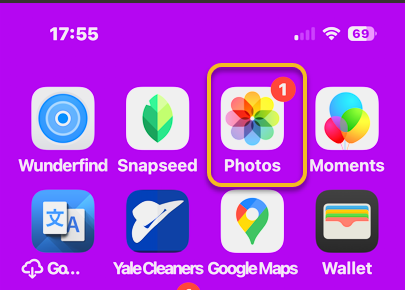
First, ipen the Photos app. Refer to the image below:
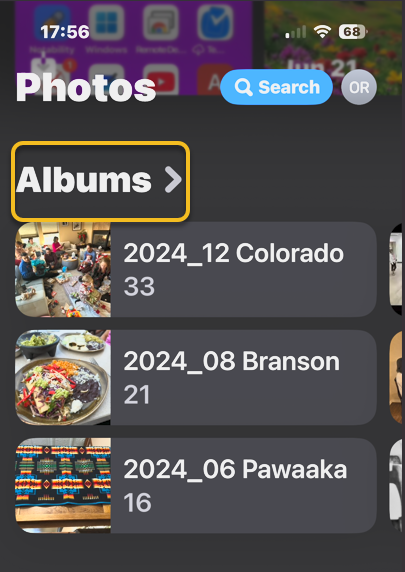
Next, scroll down and tap Albums. See the image below:
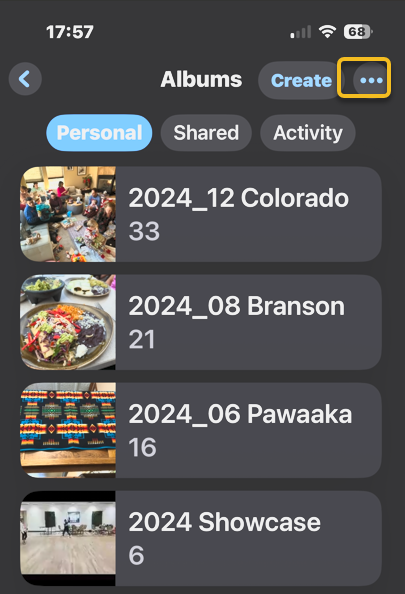
Now, tap the More icon. See the following image:
Next, tap a photo album sorting option. Refer to the image below:
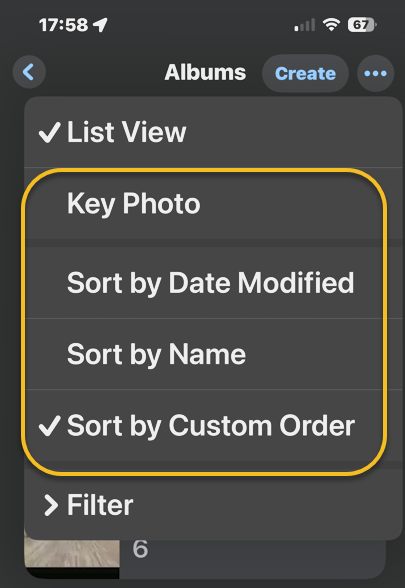
Now, back in Albums, you can also touch and hold the center of a photo album you want to move, then drag it to a new place. Release your finger to drop the album in its new location.
Note! Make sure you drag down or up and to the right. Dragging the album straight up or down will not work. In our example, we are moving the Pinterest album below the Instagram album. See the image below:

When you are done, close the Photos app, and you are finished rearranging albums on your iPhone or iPad.
Now you know how to reorder albums on iPhone and iPad!
Disclaimer
Technology is constantly evolving, and smartphone and desktop tech rarely remains static. Therefore, the information in this post is only accurate as of the date it was written. Blog posts that are older than six months may contain instructions that are no longer compatible with your device or operating system. We hope that the content from previous posts continues to function as intended. Thank you for reading TechSavvy.Life, where technology works for you.
Quote For the Day
“If you think technology can solve your security problems, then you don’t understand the problems and you don’t understand the technology.”
– Bruce Schneier, Security Technologist
(X) Twitter Info
That’s it. Please feel free to share this post! One way to share is via Twitter.
Just click the Tweet icon below. This will launch Twitter where you click its icon to post the Tweet.
Checkout TechSavvy.Life for blog posts on smartphones, PCs, and Macs! You may email us at contact@techsavvy.life for comments or questions.
Tweet
I Would Like to Hear From You
We value your feedback! Was this post helpful? Please share your comments with us. If you have a tech question related to your computer or smart device, feel free to reach out. Just send an email to contact@techsavvy.life, and be sure to include the device, app, and version you are using. To assist us further, you can also attach screenshots related to your inquiry.
The author’s Vietnam eBook on the “Battle for Tra Bong Vietnam: Events and Aftermath” can be accessed from a Kindle device or the Kindle App for a desktop or smartphone. The apps are free.

 Tech Savvy Life