

RAYMOND OGLESBY @RaymondOglesby2
September 9, 2025 – 3 minutes read time
Overview
In iOS 26, the Camera app controls have been tucked away, making the display cleaner but making it more challenging to find the camera mode (like selfie, video, or portrait) you want. We all know that taking the perfect photo can require lightning reflexes, so here’s how to launch into your camera mode of choice right from your Home Screen, bypassing your in-app controls altogether.
Why You Will Like This Tip
- Open your Camera in the exact mode you’re looking for, whether Selfie, Video, or Portrait.
- Save time by not swiping between modes.
- Avoid confusion with the iOS 26 Camera layout.
System Requirements
This tip can be performed on an iPhone running iOS 26 to be available in September 2025. This tip works on earlier OS versions as well such as iOS 18.6.
Click here to learn how to update your iPhone to the latest iOS version.
Accessing the Hidden Selfie Shortcut
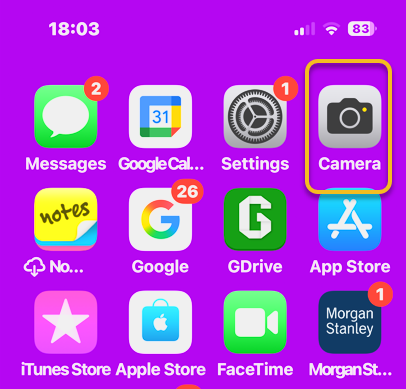
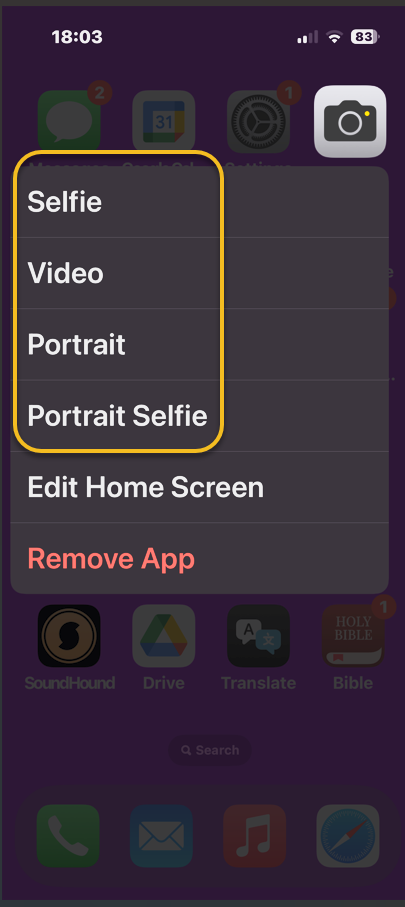
Did you know you can open your Camera app to a specific mode right from your Home Screen? No need to swipe to find the right one. All you have to do is long-press on your Camera icon and then select either Selfie, Video, Portrait, or Portrait Selfie.
Note! This only works from your Home Screen, not from a Lock Screen shortcut.
First, on your Home Screen, long-press on your Camera app icon. Refer to the image below:
Next, tap Selfie, Video, Portrait, or Portrait Selfie from the menu. See the image below:
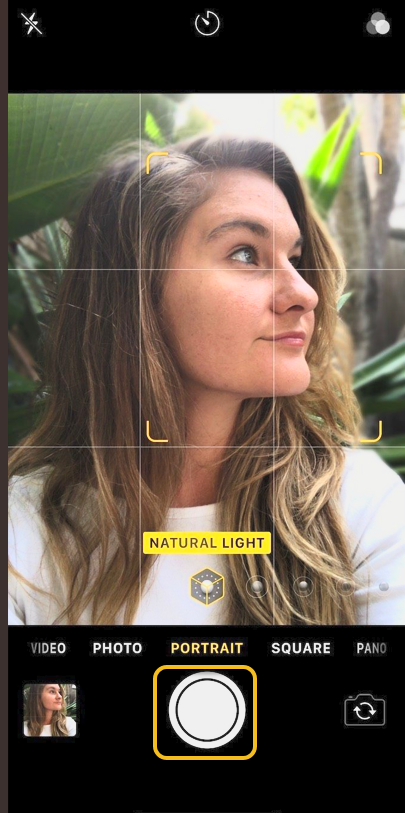
Now, yourCamera app will open in your selected mode, ready to shoot. Tap the Capture/Record icon , and you are set! See the following image:
Say cheese! Your photos will capture as usual, and if you want to switch modes, you can do it in the now-open Camera app.
Disclaimer
Technology is constantly evolving, and smartphone and desktop tech rarely remains static. Therefore, the information in this post is only accurate as of the date it was written. Blog posts that are older than six months may contain instructions that are no longer compatible with your device or operating system. We hope that the content from previous posts continues to function as intended. Thank you for reading TechSavvy.Life, where technology works for you.
Quote For the Day
“In a tech-savvy world, true innovation lies in being people-savvy.”
– Whitney Wolfe Herd, Founder of Bumble
(X) Twitter info
You are finished. Please feel free to share this post! One way to share is via Twitter.
Just click the Tweet icon below. This will launch Twitter where you click its icon to post the Tweet.
Checkout TechSavvy.Life for blog posts on smartphones, PCs, and Macs! You may email us at contact@techsavvy.life for comments or questions.
Tweet
I Would Like to Hear From You
We value your feedback! Was this post helpful? Please share your comments with us. If you have a tech question related to your computer or smart device, feel free to reach out. Just send an email to contact@techsavvy.life, and be sure to include the device, app, and version you are using. To assist us further, you can also attach screenshots related to your inquiry.
The author’s Vietnam eBook on the “Battle for Tra Bong Vietnam: Events and Aftermath” can be accessed from a Kindle device or the Kindle App for a desktop or smartphone. The apps are free.
 Tech Savvy Life