


RAYMOND OGLESBY @RaymondOglesby2
May 5 2026 – 4 minutes read time
Overview
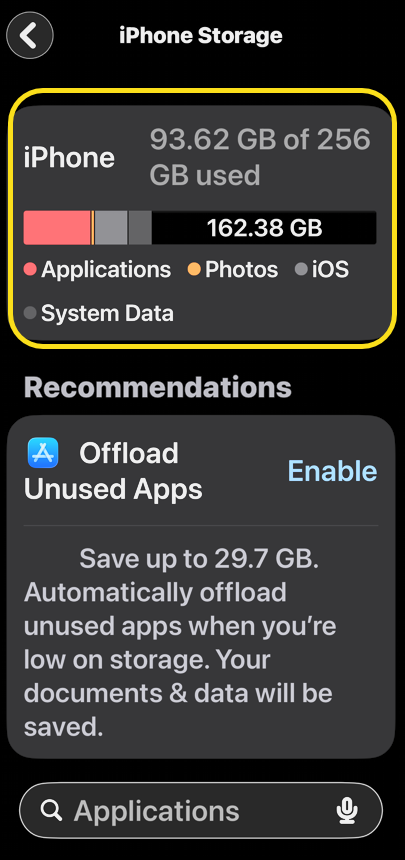
Do voicemails take up storage on your iPhone? Yes, so if you are looking to clear up storage, delete old voicemails! If you clear all voicemail but notice no change in your storage space, it’s because there’s a hidden folder for deleted voicemails on your iPhone.
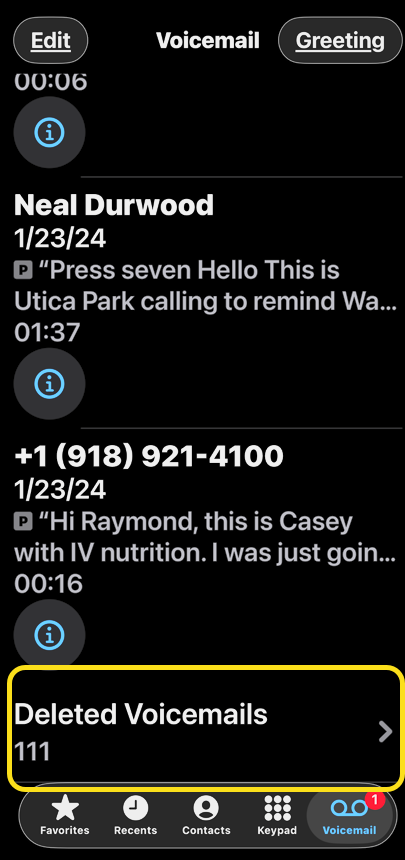
When you delete a voicemail, it is moved to a special folder. This means your storage space remains the same. You have to delete the voicemails from this special folder to free up storage on your iPhone.
How do you empty voicemail? To truly clear voicemail, you need to clear Deleted Voicemails. Deleted Voicemails on iPhone can be listened to, undeleted, and permanently deleted with a Clear All. Let’s explore how to delete your voicemails on iPhone permanently.
Key Takeaways
- Clear up storage space that’s being taken up by voicemails.
- Get rid of junk voicemails you don’t need anymore.
System Requirements
This tip was performed on an iPhone 17 Pro running uOS 26.4.
Click here to learn how to update your iPhone to the latest iOS version.
View Your Storage Space
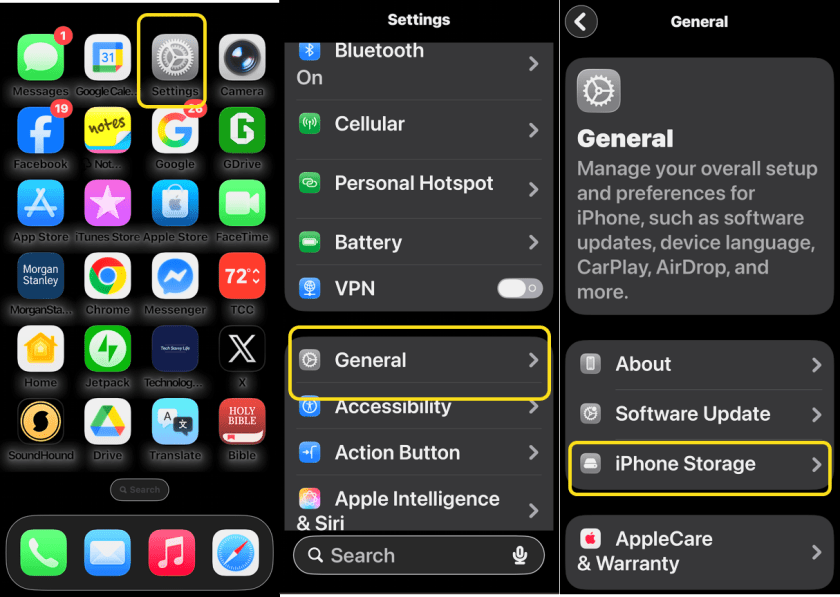
First, let’s examine your iPhone’s storage space. Head to:
Settings > General > iPhone Storage
Refer to the image below:
Next, take a screenshot of your iPhone Storage screen. See the image below:
Clear Your Voicemails
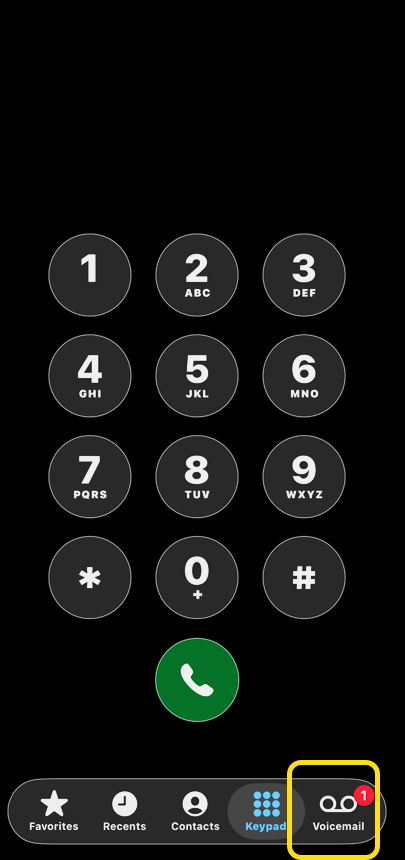
First, open the Phone app, and tap the Voicemail icon. Refer to the image below:
Next, tap Deleted Voicemails at the bottom of your list of voicemails. You may have to scroll down a lot, depending on the number of voicemails you have, to reach the bottom of the list. See the image below:
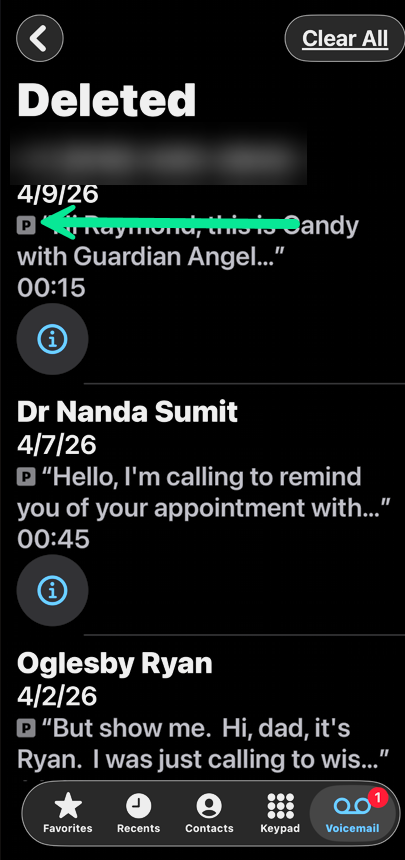
Now, you can delete an individual voicemail by swiping left on it. See the following image:
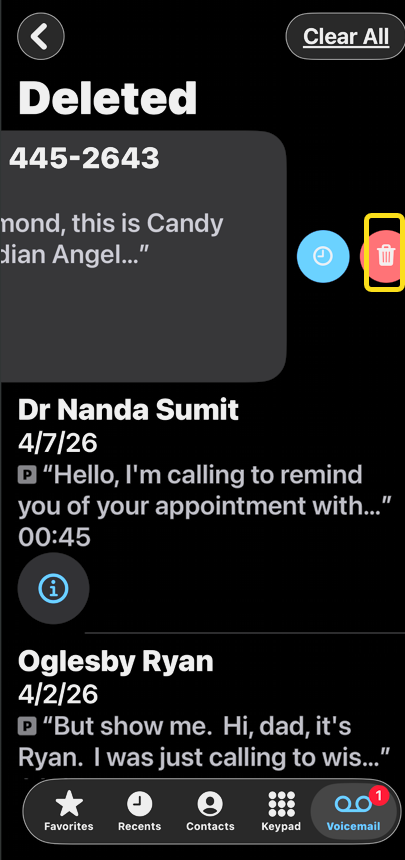
Next, tap the Trash icon to clear it. Refer to the be image below:
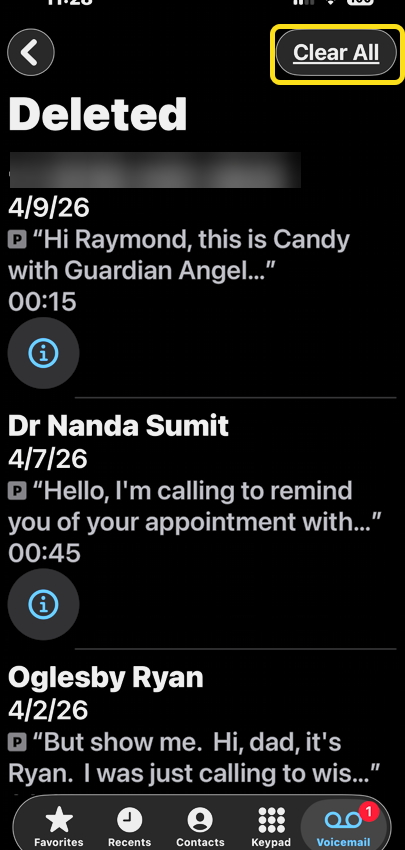
Alternatively, you can delete all your voicemails by tapping Clear All. See the image below:
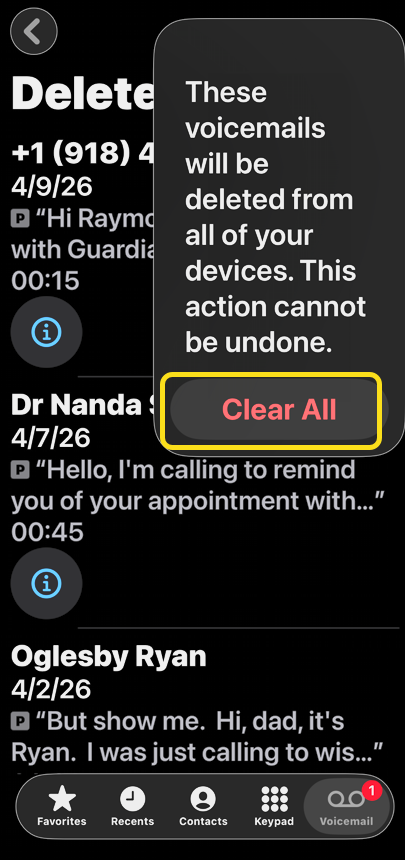
Now, tap Clear All again to confirm. See the following image:
View Your Storage Space Again
Let’s examine your iPhone’s storage space again by following the steps under View Your Storage Space. Hopefully, you increased your storage space.
Summary
That’s all there is to it! If someone sends you a voicemail you delete, know that it isn’t gone until it’s been completely cleared. This is reassuring if you accidentally deleted a priceless, hilarious voicemail from a friend. Depending on your cellular provider, the Deleted Voicemails folder might not automatically Clear All voicemails. If your carrier does not automatically clear your voicemails, you will have to do it manually.
Disclaimer
Technology is constantly evolving, and smartphone and desktop tech rarely remains static. Therefore, the information in this post is only accurate as of the date it was written. Blog posts that are older than six months may contain instructions that are no longer compatible with your device or operating system. We hope that the content from previous posts continues to function as intended. Thank you for reading TechSavvy.Life, where technology works for you.
Quote For the Day
Technological progress has merely provided us with more efficient means for going backwards.
– Aldous Huxley
(X) Twitter Info
That’s it. Please feel free to share this post! One way to share is via Twitter.
Just click the Tweet icon below. This will launch Twitter where you click its icon to post the Tweet.
Checkout TechSavvy.Life for blog posts on smartphones, PCs, and Macs! You may email us at contact@techsavvy.life for comments or questions.
Tweet
I Would Like to Hear From You
We value your feedback! Was this post helpful? Please share your comments with us. If you have a tech question related to your computer or smart device, feel free to reach out. Just send an email to contact@techsavvy.life, and be sure to include the device, app, and version you are using. To assist us further, you can also attach screenshots related to your inquiry.
The author’s Vietnam eBook, “Battle for Tra Bong Vietnam: Events and Aftermath,” is available on Kindle devices and the Kindle App for desktop, laptop, and smartphone. The apps are free.


