


RAYMOND OGLESBY @RaymondOglesby2
July 28, 2026 – 3 minutes read time
Overview
The People album in Apple’s Photos app is a very handy feature for finding pictures of a particular person. But what if there’s a particular person whose People album you want to remove?
It’s easy to remove a person from the People album on your iPhone or iPad. Do not worry, though, if you can always add back the person you removed. Here’s how to remove a People album in Photos on iPhone.
Key Tskeaways
- Hide photos on iPhone of people you don’t want to see in the People album.
- Keep photos of the person in your regular photos library, without seeing them in the People album.
System Requirements
This tip was performed on an iPhone 17 Pro running iOS 26.5.
Click here to learn how to update your iPhone to the latest iOS version.
Remove a People Album
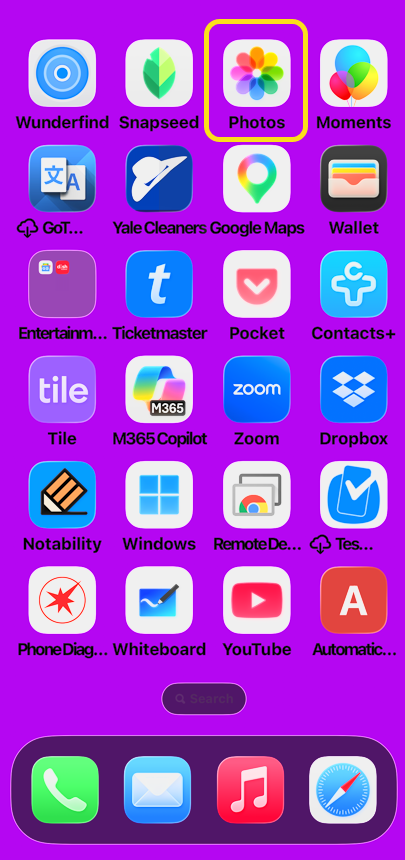
1. Open the Photos app on your iPhone. Refer the image below:
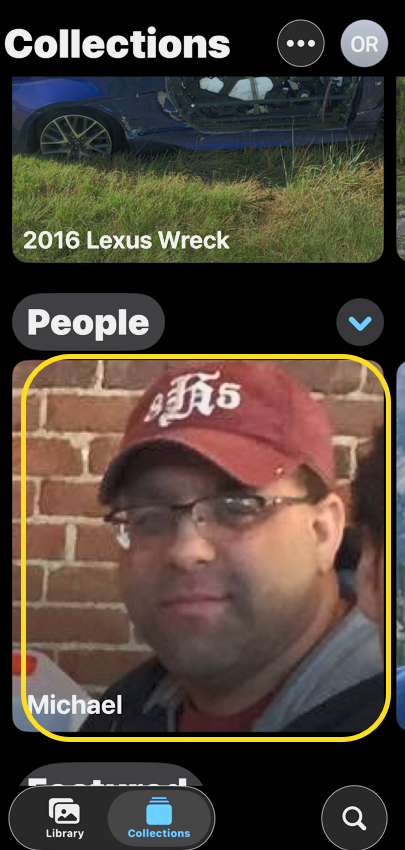
2. Tap the Collections tab. See the image below;

3. In the People section, tap the person album that you want to remove. See the following image:
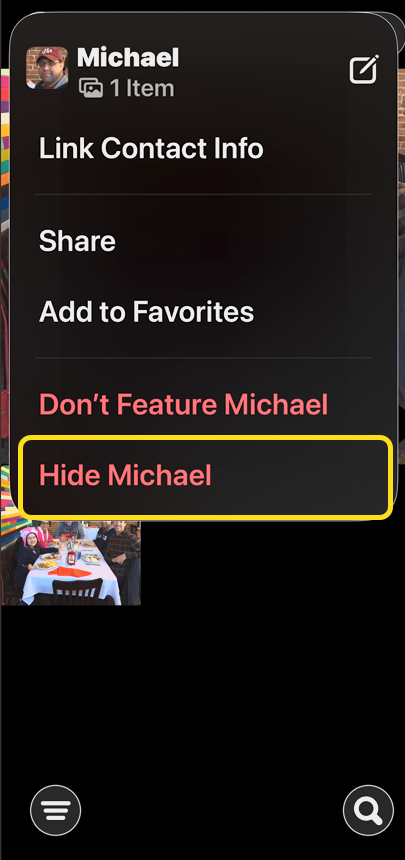
4. Tap the More icon. Refer to the image below:

5. Tap Hide (Name). See the image below:
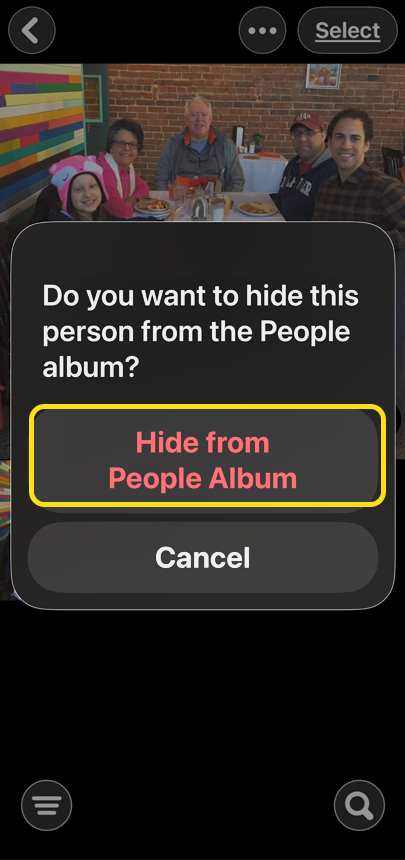
6. Tap Hide from People Album. See the following image:
Disclaimer
Technology is constantly evolving, and smartphone and desktop tech rarely remains static. Therefore, the information in this post is only accurate as of the date it was written. Blog posts that are older than six months may contain instructions that are no longer compatible with your device or operating system. We hope that the content from previous posts continues to function as intended. Thank you for reading TechSavvy.Life, where technology works for you.
Quote For the Day
As a technology, the book is like a hammer. That is to say, it is perfect: a tool ideally suited to its task. Hammers can be tweaked and varied but will never go obsolete. Even when builders pound nails by the thousand with pneumatic nail guns, every household needs a hammer.
– James Gleick
(X) Twitter Info
That’s it. Please feel free to share this post! One way to share is via Twitter.
Just click the Tweet icon below. This will launch Twitter where you click its icon to post the Tweet.
Checkout TechSavvy.Life for blog posts on smartphones, PCs, and Macs! You may email us at contact@techsavvy.life for comments or questions.
Tweet
I Would Like to Hear From You
We value your feedback! Was this post helpful? Please share your comments with us. If you have a tech question related to your computer or smart device, feel free to reach out. Just send an email to contact@techsavvy.life, and be sure to include the device, app, and version you are using. To assist us further, you can also attach screenshots related to your inquiry.
The author’s Vietnam eBook, “Battle for Tra Bong Vietnam: Events and Aftermath”, is available on Kindle devices and the Kindle App for desktop, laptop, and smartphone. The apps are free.


