

RAYMOND OGLESBY @RaymondOglesby2
April 28, 2026 –4 minutes read time
Pverview
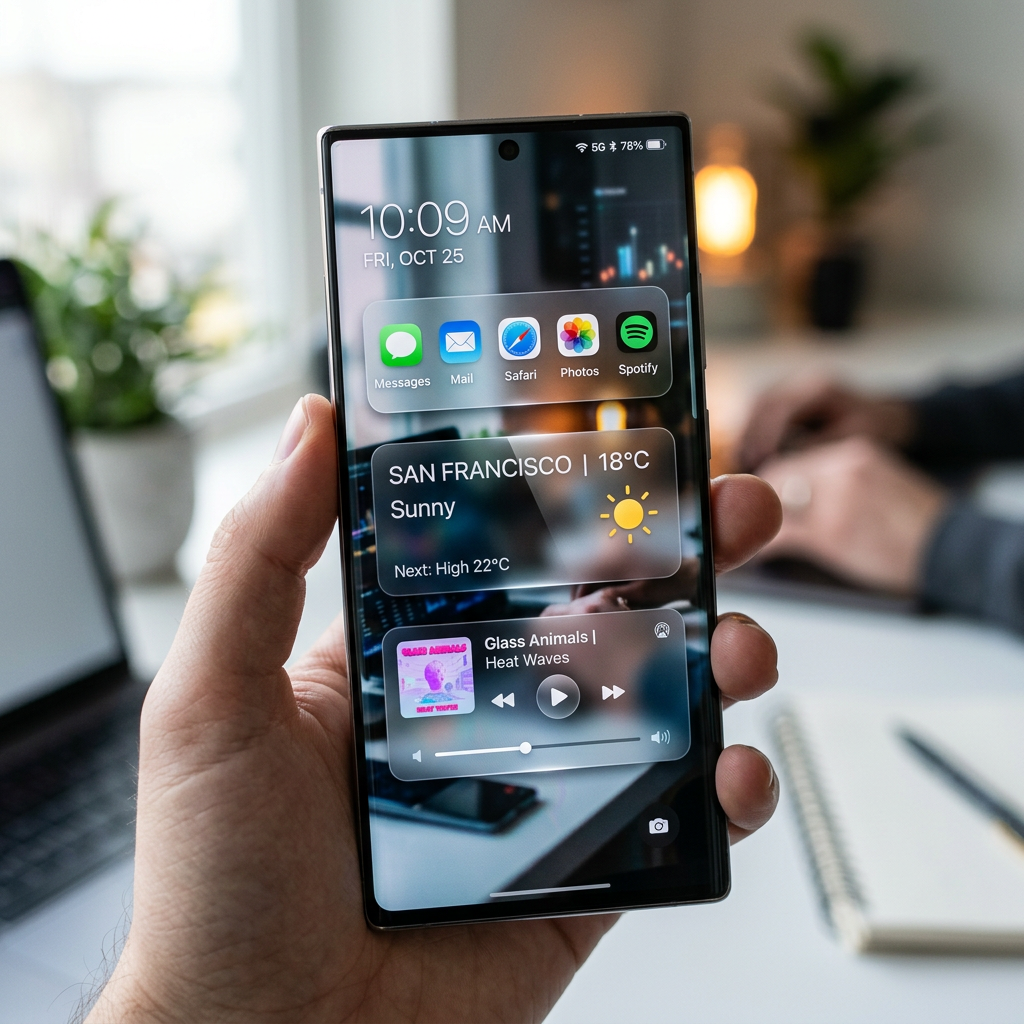
In 2025, Apple changed the naming scheme for its operating systems to align them by release year, so we currently have iOS 26 rather than iOS 19. Tying it all together is the Liquid Glass design, which gives your icons, toolbars, menus, and other elements a translucent appearance, as if you are looking through glass. The problem? Not everyone loves the new look.
Some people have even complained that it makes them feel sick in Dark Mode. Unfortunately, you cannot turn off Liquid Glass, but Apple has released a few OS updates to reduce its transparency, most recently in iOS 26.4. Let’s explore this updated feature.
Key Takeaways
- Customize your Lock screen Liquid Glass to your liking.
- Enhance the appearance of your iPhone or iPad display.
System Requirements
This tip was performed on an iPhone 17 Pro running iOS 26.4.
Click here to learn how to update your iPhone to the latest iOS version.
Reduce Transparency on Liquid Glass
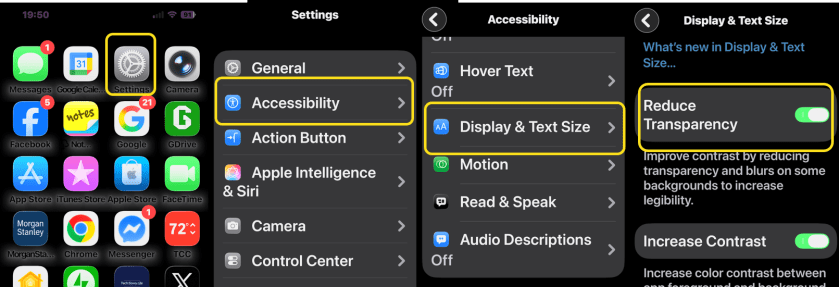
If you want to tone down the effect on an iPhone or iPad, head to:
Settings > Accessibility > Display & Text Size
and enable Reduce Transparency. Now, when you look back at the folders and menus on your Home screen, you should see that the translucent look has been replaced by a more opaque one. Refer to the image below:
Enable Dark Mode
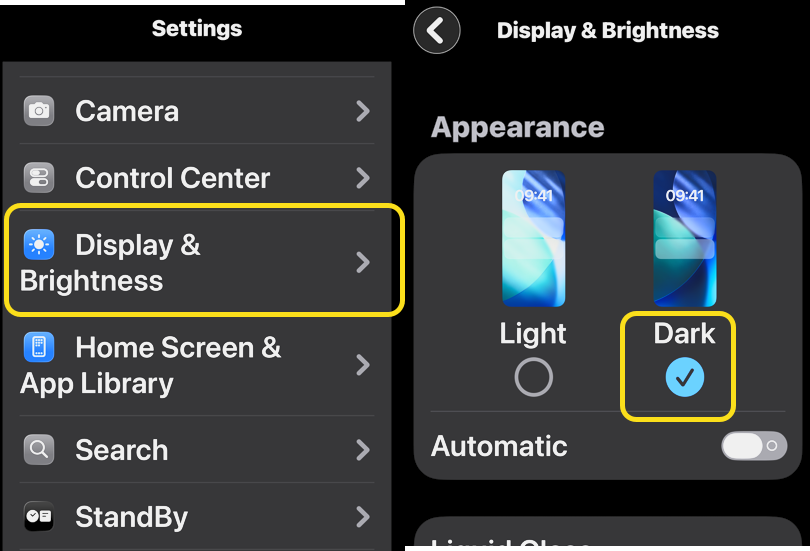
Liquid Glass looks better in Dark Mode instead of Light Mode because it hides much of the new design. To do this on an iPhone or iPad, head to:
Settings > Display & Brightness
and set the appearance to Dark. See the image below:
Customize the Look of Liquid Glass
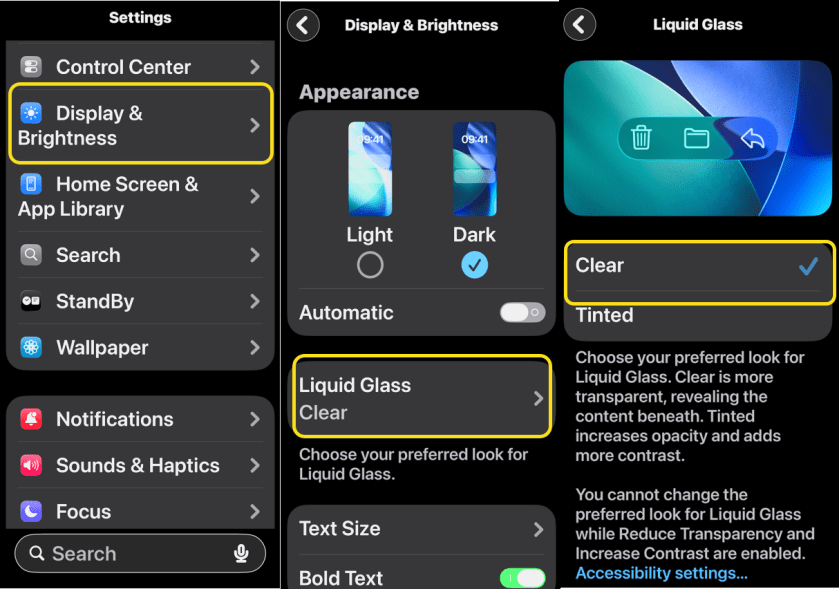
Apple first introduced greater control over the look and feel of the Liquid Glass design with iOS 26.1. To customize, head to:
Settings > Display & Brightness > Liquid Glass
then choose between Clear (more transparent) and Tinted (more opaque). The latter option is recommended if you want more contrast. You can also pair this with Dark Mode for better readability. See the following image:
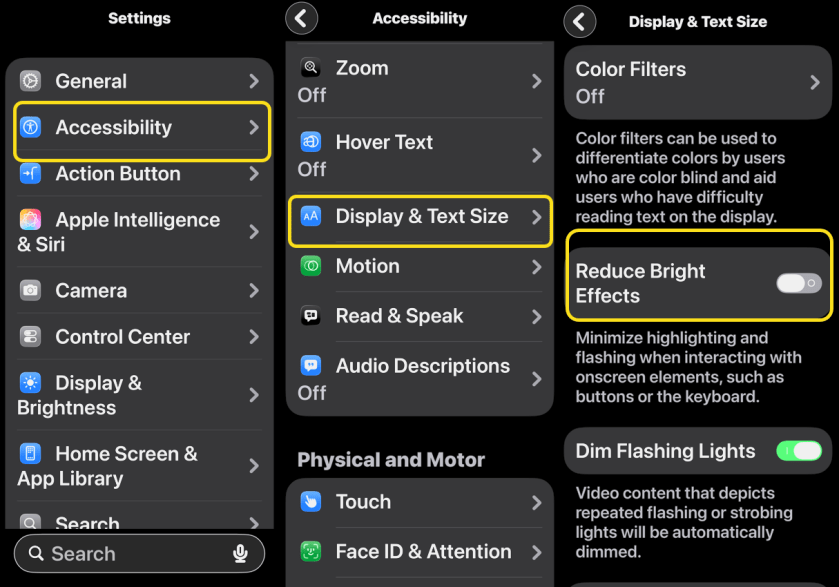
Reduce Bright Effects
You now have the ability to tone own some of the lighting effects that come with the Liquid Glass redesign. Head to:
Settings > Accessibility > Display & Text Size
then enable Reduce Bright Effects to make the change.
It’s a subtle difference, but one that might help make the theme more tolerable. Refer to the image below:
Reduce Motion
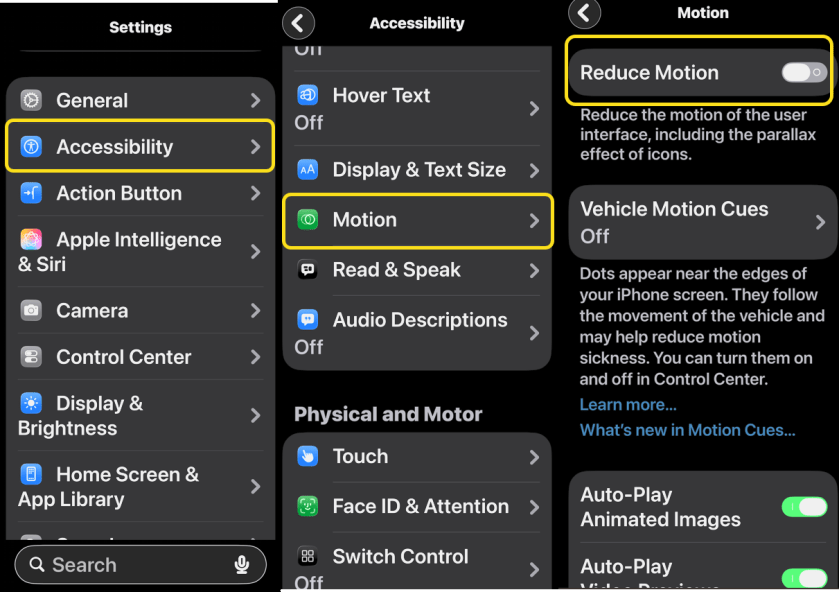
It’s also worth noting that Apple has enhanced its Reduce Motion option to incorporate Liquid Glass effects. Just go to:
Settings > Accessibility > Motion
and enable Reduce Motion. See the image below:
Disclaimer
Technology is constantly evolving, and smartphone and desktop tech rarely remains static. Therefore, the information in this post is only accurate as of the date it was written. Blog posts that are older than six months may contain instructions that are no longer compatible with your device or operating system. We hope that the content from previous posts continues to function as intended. Thank you for reading TechSavvy.Life, where technology works for you.
Quote For the Day
Technology feeds on itself. Technology makes more technology possible.
– Alvin Toffler
(X) Twitter Info
Yea. You are finished.. Please feel free to share this post! One way to share is via Twitter.
Just click the Tweet icon below. This will launch Twitter where you click its icon to post the Tweet.
Check out TechSavvy.Life for blog posts on smartphones, PCs, and Macs! You may email us at contact@techsavvy.life for comments or questions.
Tweet
I Would Like to Hear From You
We value your feedback! Was this post helpful? Please share your comments with us. If you have a tech question related to your computer or smart device, feel free to reach out. Just send an email to contact@techsavvy.life, and be sure to include the device, app, and version you are using. To assist us further, you can also attach screenshots related to your inquiry.
The author’s Vietnam eBook, “Battle for Tra Bong Vietnam: Events and Aftermath,” is available on Kindle devices and the Kindle App for desktop, laptop, and smartphone. The apps are free.


