


RAYMOND OGLESBY @RaymondOglesby2
September 22, 2026 – 4 minutes read time
Overview
Artificial Intelligence is becoming an inescapable fact of life. It’s everywhere we turn, and it’s starting to feel like it’s something we have to take advantage of or get left behind. Using ChatGPT AI comes with some inherent risks to your privacy and digital security. There is no such thing as completely private artificial intelligence. However, there are ways to use it safely.
Is ChatGPT AI safe to use on your iPhone ? Staying private while using artificial intelligence is not easy. However, if you’re going to use the latest ChatGPT AI assistant, it’s important to do what you can to ensure your data is not compromised. Let’s explore ways to keep ChatGPT AI private.
Key Tskeaways
- You can use ChatGPT AI without compromising your data.
- Maintain as much of your privacy as you can while using ChatGPT AI.
System Requirements
This tip was performed on iPhone 17 Pro running iOS 26.5.
Click here to learn how to update your iPhone to the latest iOS version.
Making ChatGPT Safe
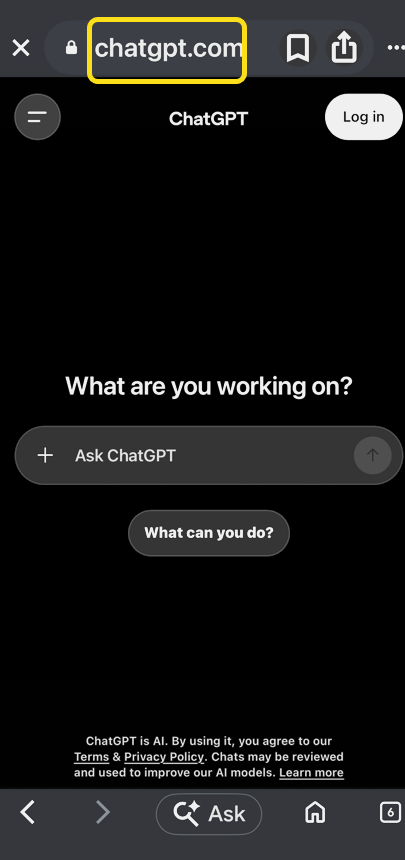
When using any AI assistant, avoid creating an account if you can. Some chatbots, including ChatGPT, Copilot, and Duck.ai allow you to use them without an account.
- If you must create an account, use Sign In with Apple when possible. For the purposes of this post, we are not signing in. Refer to the image below:
Opt out of training. ChatGPT and other chatbots will use the data you feed them to train their AI models.
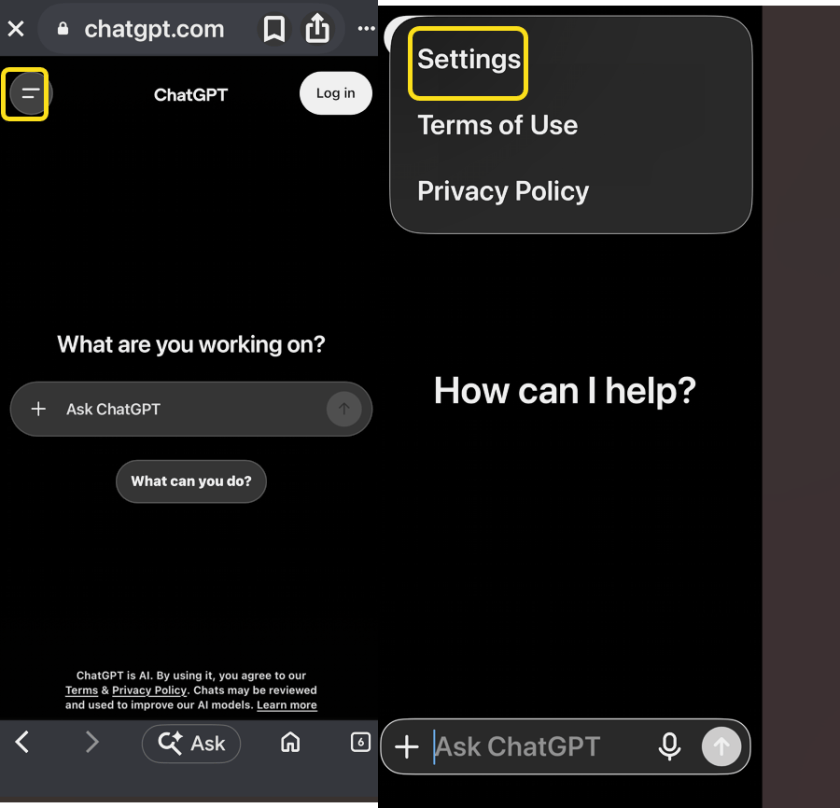
2. Tap the More icon then select Settings. See the image below:
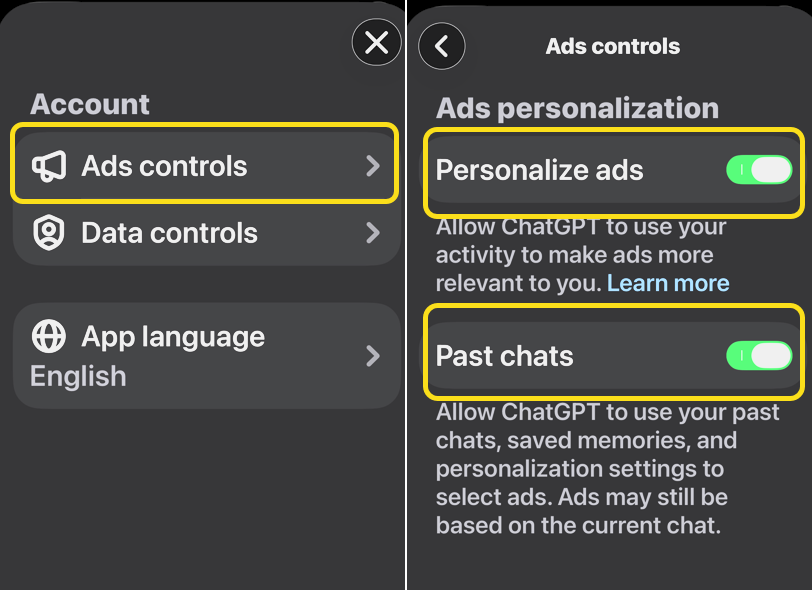
3. Tap Ads controls then toggle OFF Personalize ads and Past chats. See the following image:
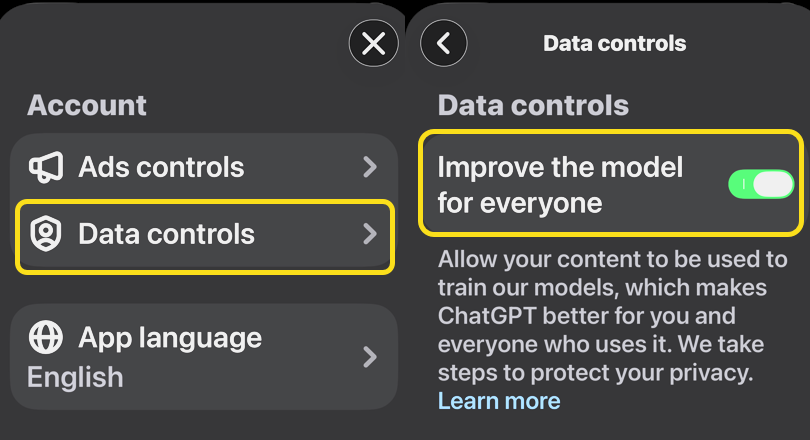
4. Tap Data controls and toggle OFF Improve the model for everyone. Refer to the image below:
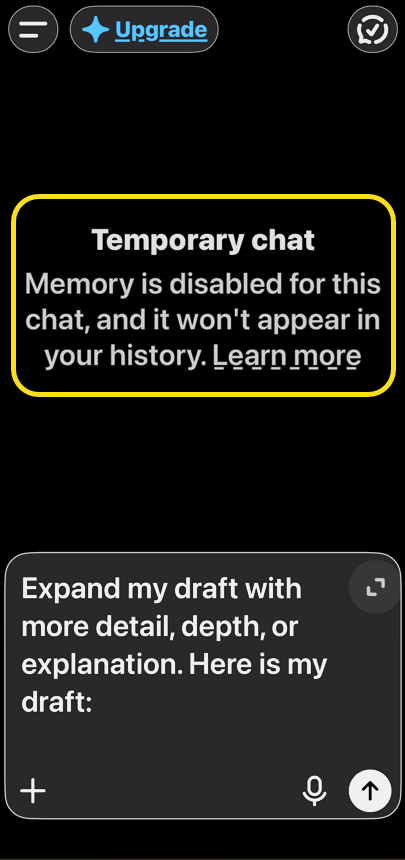
5. Turn on Temporary Chat: This mode does not save your chat history or use the data. Treat ChatGPT as though anything you say to them will be public knowledge. Do not give any personal information that you want to keep private. See the image below:
Ultimately, ChatGPT chats are not private. The company can access the conversation you have. But if you follow these steps, you can stay as safe and private as possible when using ChatGPT AI.
Disclaimer
Technology is constantly evolving, and smartphone and desktop tech rarely remains static. Therefore, the information in this post is only accurate as of the date it was written. Blog posts that are older than six months may contain instructions that are no longer compatible with your device or operating system. We hope that the content from previous posts continues to function as intended. Thank you for reading TechSavvy.Life, where technology works for you.
Quote For the Day
Leaving society to algorithms will be like leaving healthcare to stethoscopes.
– Abhijit Naskar
(X) Twitter Info
That’s it. Please feel free to share this post! One way to share is via Twitter.
Just click the Tweet icon below. This will launch Twitter where you click its icon to post the Tweet.
Checkout TechSavvy.Life for blog posts on smartphones, PCs, and Macs! You may email us at contact@techsavvy.life for comments or questions.
Tweet
I Would Like to Hear From You
We value your feedback! Was this post helpful? Please share your comments with us. If you have a tech question related to your computer or smart device, feel free to reach out. Just send an email to contact@techsavvy.life, and be sure to include the device, app, and version you are using. To assist us further, you can also attach screenshots related to your inquiry.
The author’s Vietnam eBook, “Battle for Tra Bong Vietnam: Events and Aftermath”, is available on Kindle devices and the Kindle App for desktop, laptop, and smartphone. The apps are free.


