

RAYMOND OGLESBY @RaymondOglesby2
November 10 2026 – 4 minutes read time
Overview
Apple introduces new iPhone wallpapers every year, and you can download iOS 27’sGlass wallpapers here or 4K wallpapers here for iOS 27.
Note! The downloads are in-app purchase. If you search for iOS 27 wallpapers from the App Store, you will be overwhelmed as to the number of available apps.
But iOS 27 also lets you create your own custom wallpapers.
This year as part of iOS 27’s overall theme of major AI improvements, Apple has given its Image Playground app an overhaul.
But you do not even need to open the Image Playground app to create wallpapers. Let’s explore this feature.
Key Takeaways
- Chose from a wide variety of iOS 27 wallpapers for your Lock Screen.
- Customize your Lock Screen as to style, effects, widgets and lots more.
Suste, Requirements
This post was performed on an iPhone 17 Pro running iOS 27.
Click here to learn how to update your iPhone to the latest iOS version.
Create Custom Wallpapers
iOS 27 lets you create your own iPhone wallpapers right from the wallpaper picker.
Go to:
Settings ⇾ Wallpaper ⇾ Add New Wallpaper
Or
long-press your Lock Screen and hit the ‘+’ button
to open iOS 27’s wallpaper gallery.
In the gallery, you will see Image Playground as an option in the top row. iOS 27 also automatically adds some AI-generated images to the Featured wallpaper section. Refer to the image below:
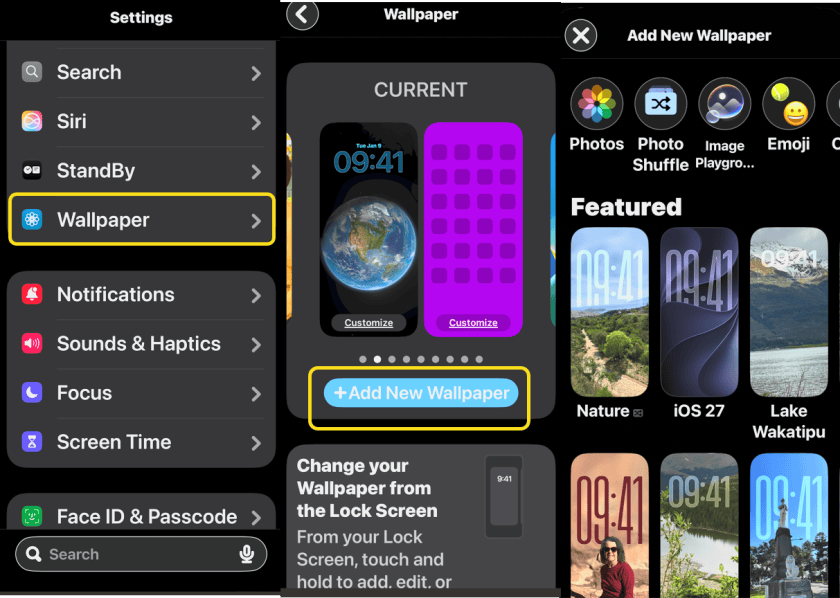
For example, you will see suggested wallpapers that are based on your own photos, but in a new style.
In our testing of iOS 27, with no effort on our part, our iPhone prepared beautifully stylized versions of some of our favorite photos that look great as wallpapers.
Wherever you see an AI-generated wallpaper in the gallery, Apple’s new Image Playground icon appears next to it. That way, it’s always clear where the image came from.
If you like one of Apple’s suggested AI wallpapers, you can choose it and be all set.
But iOS 27 also lets you create fully custom wallpapers by hitting the Image Playground button in the top row. Image Playground will ask you to describe your image, and let you optionally choose a style or base it on an existing photo or person. See the image below:
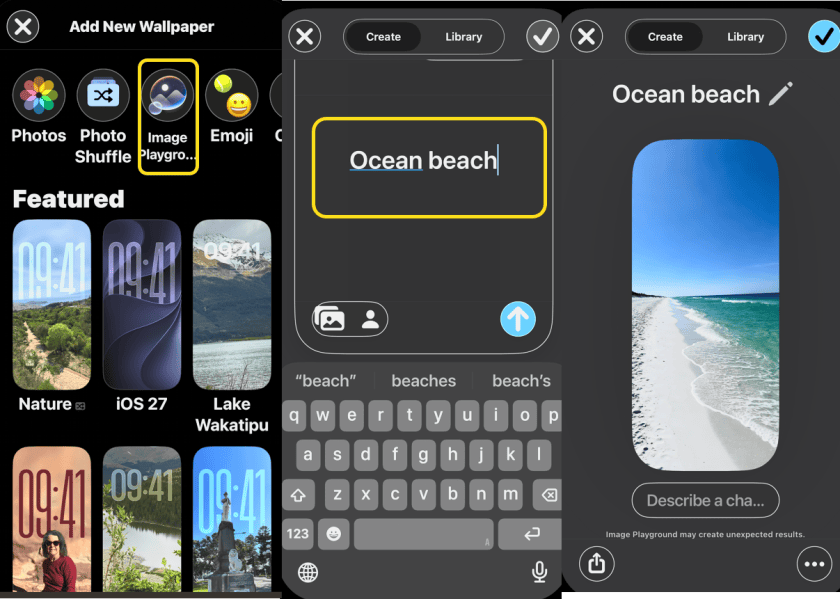
When the image is created, it’s automatically the perfect size for an iPhone wallpaper.
Disclaimer
Technology is constantly evolving, and smartphone and desktop tech rarely remains static. Therefore, the information in this post is only accurate as of the date it was written. Blog posts that are older than six months may contain instructions that are no longer compatible with your device or operating system. We hope that the content from previous posts continues to function as intended. Thank you for reading TechSavvy.Life, where technology works for you.
Quote For the Day
PinThe digital camera is a great invention because it allows us to reminisce. Instantly
– Demetri Martin
(X) Twitter Info
That’s it. Please feel free to share this post! One way to share is via Twitter.
Just click the Tweet icon below. This will launch Twitter where you click its icon to post the Tweet.
Checkout TechSavvy.Life for blog posts on smartphones, PCs, and Macs! You may email us at contact@techsavvy.life for comments or questions.
Tweet
Would Like to Hear From You
We value your feedback! Was this post helpful? Please share your comments with us. If you have a tech question related to your computer or smart device, feel free to reach out. Just send an email to contact@techsavvy.life, and be sure to include the device, app, and version you are using. To assist us further, you can also attach screenshots related to your inquiry.
The author’s Vietnam eBook, “Battle for Tra Bong Vietnam: Events and Aftermath”, is available on Kindle devices and the Kindle App for desktop, laptop, and smartphone. The apps are free.


