


RAYMOND OGLESBY @RaymondOglesby2
June 30, 2026 – 4 minutes read time
Overview
Here’s a new Apple visual intelligence feature you will not want to miss; you can now use Visual Look Up to search images on your iPhone screen across apps.
What can you do with Apple Visual Intelligence? More than ever before! The latest visual intelligence feature is the ability to look up items on your iPhone screen across a variety of apps. Let’s explore how to use this new Apple Visual Intelligence feature.
Key Takeaways
- Highlight objects in a screenshot and use visual intelligence to find similar images online.
- Ask ChatGPT questions about images on your iPhone screen.
- Search supported apps like Google and Etsy to find similar products to the image on your iPhone screen.
System Requirements
This tip was tested on an iPhone 17 Pro. You will need an iPhone 15 Pro or Pro Max, or any iPhone 16 or later running iOS 26 or later for this tip to work.
Click here to learn how to update your iPhone to the latest iOS version.
Using Visual Intelligence
First, take a screenshot of an image that interests you on your iPhone. This can be anything you are interested in. Refer to the image below:

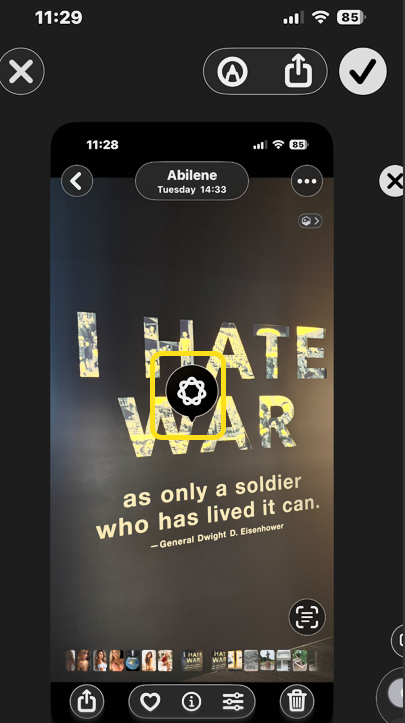
Next, use your finger to circle or scribble over the part of the screenshot you want to learn about. That area will glow with animation. See the image below:

Now, tap the Ask button. See the following image:
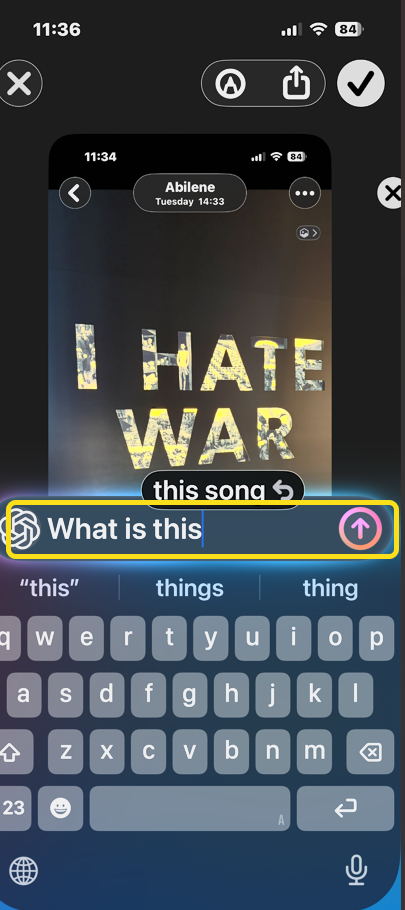
Next, type a question, then tap the Send button. Or, you can simply wait for Apple Intelligence and ChatGPT to give you general information about the image. Refer to the image below:
Now, wait a moment, and the ChatGPT results will appear onscreen. See the image below:
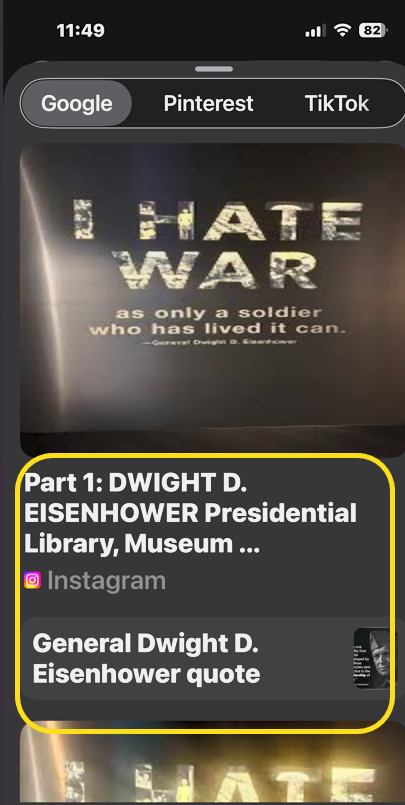
Next, from your screenshot, you can also swipe up to see the image search results. You can tap images from sites to purchase the item or learn more. See the following image:

In the future, Apple promises that you will also be able to see results directly from apps like Etsy and Pinterest here, but that feature is not available as of this writing.
We found this feature cumbersome and frustrating to use. Anyway, that’s how to use Apple Visual Intelligence to look up an on-screen image.
Disclaimer
Technology is constantly evolving, and smartphone and desktop tech rarely remains static. Therefore, the information in this post is only accurate as of the date it was written. Blog posts that are older than six months may contain instructions that are no longer compatible with your device or operating system. We hope that the content from previous posts continues to function as intended. Thank you for reading TechSavvy.Life, where technology works for you.
Quote For the Day
The role of the artist today is to defend feeling against the machine.
– Marty Rubin
(X) Twitter Info
You are finished. Please feel free to share this post! One way to share is via Twitter.
Just click the Tweet icon below. This will launch Twitter where you click its icon to post the Tweet.
Checkout TechSavvy.Life for blog posts on smartphones, PCs, and Macs! You may email us at contact@techsavvy.life for comments or questions.
Tweet
I Would Like to Here From You
We value your feedback! Was this post helpful? Please share your comments with us. If you have a tech question related to your computer or smart device, feel free to reach out. Just send an email to contact@techsavvy.life, and be sure to include the device, app, and version you are using. To assist us further, you can also attach screenshots related to your inquiry.
The author’s Vietnam eBook, “Battle for Tra Bong Vietnam: Events and Aftermath”, is available on Kindle devices and the Kindle App for desktop, laptop, and smartphone. The apps are free.

